 Omnira
 Section reference › Content
Split list "type": "split-list"
A heading and buttons on the left that stay in place while a numbered list scrolls by on the right. Use it for reasons to choose you, values, FAQs-style points or a step-by-step guide with more text.
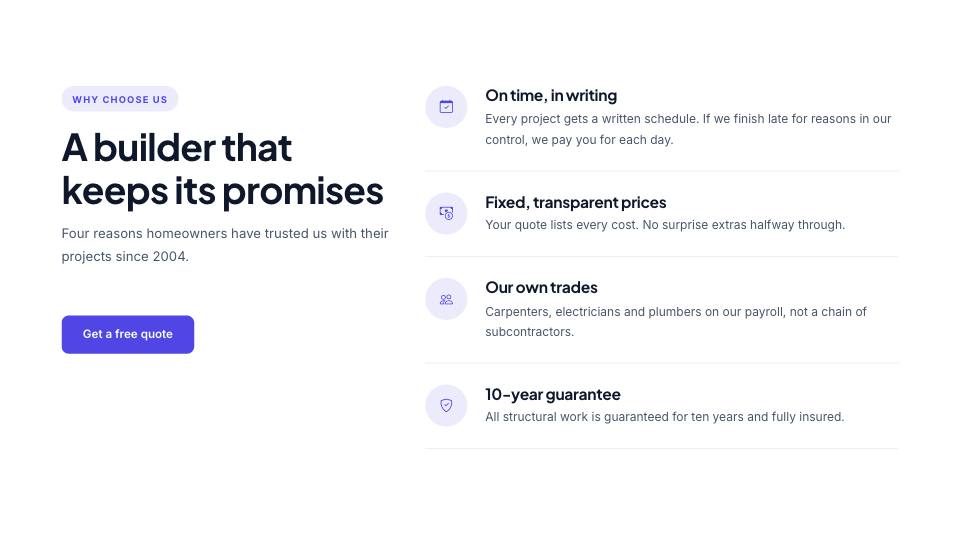
Example#
Paste this into the sections list of a page file:
JSON
{
  "type": "split-list",
  "eyebrow": "Why choose us",
  "title": "A builder that keeps its promises",
  "text": "Four reasons homeowners have trusted us with their projects since 2004.",
  "buttons": [
    {
      "label": "Get a free quote",
      "href": "contact.html"
    }
  ],
  "items": [
    {
      "icon": "calendar-check",
      "title": "On time, in writing",
      "text": "Every project gets a written schedule. If we finish late for reasons in our control, we pay you for each day."
    },
    {
      "icon": "cash-coin",
      "title": "Fixed, transparent prices",
      "text": "Your quote lists every cost. No surprise extras halfway through."
    },
    {
      "icon": "people",
      "title": "Our own trades",
      "text": "Carpenters, electricians and plumbers on our payroll, not a chain of subcontractors."
    },
    {
      "icon": "shield-check",
      "title": "10-year guarantee",
      "text": "All structural work is guaranteed for ten years and fully insured."
    }
  ]
}Options#
| Option | Type | Default | Description |
|---|---|---|---|
eyebrow | string | — | Small label shown above the title. The heading is always left-aligned in this section. |
title | string (HTML allowed) | — | Section heading. You can use <em> or <br> inside it. The heading is always left-aligned in this section. |
text | string | — | Short intro paragraph under the title. The heading is always left-aligned in this section. |
items | array | — | The list entries. See the "items" fields. |
buttons | array | — | Buttons under the heading on the left. See the "buttons" fields. |
Also accepts the options every section accepts: id, tone, padding, fluid, class, hidden.
Fields of each entry in items#
| Option | Type | Default | Description |
|---|---|---|---|
title | string | — | Entry title. |
text | string | — | Short paragraph. |
icon | string | — | Bootstrap Icons name shown instead of the number (optional). |
Fields of each entry in buttons#
| Option | Type | Default | Description |
|---|---|---|---|
label | string | — | Button text. A button without a label is not shown. |
href | string | — | Link address, e.g. "contact.html" or "#pricing". Default "#". |
style | string | — | primary (default) | outline | light | dark | accent | link. "link" is a text link with an arrow. |
icon | string | — | Bootstrap Icons name shown after the label, without "bi-" (e.g. "arrow-right"). |
video | string | — | A YouTube/Vimeo embed URL. The button then opens the video in a pop-up instead of following href. |
Tips#
- Leave out "icon" to show numbers 01, 02, 03...
- The sticky left column only has an effect when the list is taller than the heading, so 4 to 6 entries work best.
Editing it in the HTML files#
The list is ol.split-items; each li holds the number or icon in .split-num, the title in h3 and the text in p.
Where it's used#
Open these pages in template/ to see it working:
- Creative Agency:
template/creative-agency/index.html(sourcesrc/demos/creative-agency/pages/index.json) - Corporate:
template/corporate/index.html(sourcesrc/demos/corporate/pages/index.json) - Finance:
template/finance/home-2.html(sourcesrc/demos/finance/pages/home-2.json) - Law Firm:
template/law-firm/index.html(sourcesrc/demos/law-firm/pages/index.json) - SaaS Product:
template/saas/home-2.html(sourcesrc/demos/saas/pages/home-2.json) - Mobile App:
template/mobile-app/careers.html(sourcesrc/demos/mobile-app/pages/careers.json) - Tech Conference:
template/conference/about.html(sourcesrc/demos/conference/pages/about.json) - Online Academy:
template/education/home-2.html(sourcesrc/demos/education/pages/home-2.json) - Restaurant:
template/restaurant/home-2.html(sourcesrc/demos/restaurant/pages/home-2.json) - Coffee Shop:
template/cafe/index.html(sourcesrc/demos/cafe/pages/index.json) - Hotel & Resort:
template/hotel/home-2.html(sourcesrc/demos/hotel/pages/home-2.json) - Wedding:
template/wedding/services.html(sourcesrc/demos/wedding/pages/services.json) - Gym & Fitness:
template/gym/about.html(sourcesrc/demos/gym/pages/about.json) - Yoga Studio:
template/yoga/home-2.html(sourcesrc/demos/yoga/pages/home-2.json) - Day Spa & Salon:
template/spa/home-2.html(sourcesrc/demos/spa/pages/home-2.json) - Medical Clinic:
template/medical/index.html(sourcesrc/demos/medical/pages/index.json) - Dental Clinic:
template/dental/emergency.html(sourcesrc/demos/dental/pages/emergency.json) - Pet Care:
template/pet-care/emergency.html(sourcesrc/demos/pet-care/pages/emergency.json) - Construction:
template/construction/about.html(sourcesrc/demos/construction/pages/about.json) - Car Dealer:
template/car-dealer/index.html(sourcesrc/demos/car-dealer/pages/index.json) - Travel Agency:
template/travel/index.html(sourcesrc/demos/travel/pages/index.json) - Architecture Studio:
template/architecture/index.html(sourcesrc/demos/architecture/pages/index.json) - Interior Design:
template/interior-design/services.html(sourcesrc/demos/interior-design/pages/services.json) - Portfolio:
template/portfolio/services.html(sourcesrc/demos/portfolio/pages/services.json) - Music Festival:
template/music-festival/travel.html(sourcesrc/demos/music-festival/pages/travel.json) - Fashion Store:
template/fashion-store/about.html(sourcesrc/demos/fashion-store/pages/about.json) - Logistics:
template/logistics/home-2.html(sourcesrc/demos/logistics/pages/home-2.json)