 Omnira
 Section reference › Real estate
Property search "type": "search"
A property search bar with keyword, city, type, max price and bedrooms, and optional Buy/Rent tabs. It sends visitors to your listings page with those filters applied. Use it on real estate home pages.
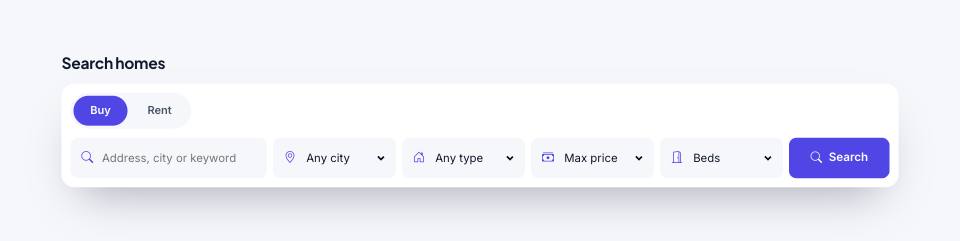
Example#
Paste this into the sections list of a page file:
JSON
{
  "type": "search",
  "tone": "alt",
  "title": "Search homes",
  "tabs": true
}Options#
| Option | Type | Default | Description |
|---|---|---|---|
title | string | — | Small heading above the search box. |
tabs | boolean | false | Show Buy / Rent tabs above the fields. Values: true | false |
action | string | properties.html | Page that shows the results. It needs a properties section with "sidebar": true, which reads the search from the address. |
placeholder | string | Address, city or keyword | Hint text in the keyword field. |
overlap | boolean | false | Pulls the box up over the bottom of the previous section (e.g. a hero) and removes its background. Values: true | false |
padding | string | sm | Common option; this section defaults it to "sm". Values: none | sm | md | lg |
cities | array | — | Options for the city dropdown. Default: every city in data.json properties. |
types | array | — | Options for the type dropdown. Default: every property type in data.json. |
prices | array | — | Options for the max price dropdown as [value, label] pairs, e.g. [[300000, "€300k"]]. Default: 500k, 1M, 2M, 5M with the demo currency. |
Also accepts the options every section accepts: id, tone, padding, fluid, class, hidden.
Tips#
- This is a real estate section: the City and Type dropdowns are filled from the "properties" list in the demo's data.json. On a page without that data they only show "Any city" and "Any type".
- The hero section's "search" variant has the same search box built in; use this section when you want it as its own band.
Editing it in the HTML files#
It is a normal GET form (form.search-box). Its action is the results page and each field's name (q, status, city, type, max, beds) becomes a filter in the address, e.g. properties.html?city=Miami&beds=3.
Where it's used#
Open these pages in template/ to see it working:
- Real Estate:
template/real-estate/home-2.html(sourcesrc/demos/real-estate/pages/home-2.json)