 Omnira
 Section reference › Showcase & media
Portfolio grid "type": "portfolio"
A grid of project images with captions and category filter buttons. Use it to show case studies, past work or a gallery of projects.
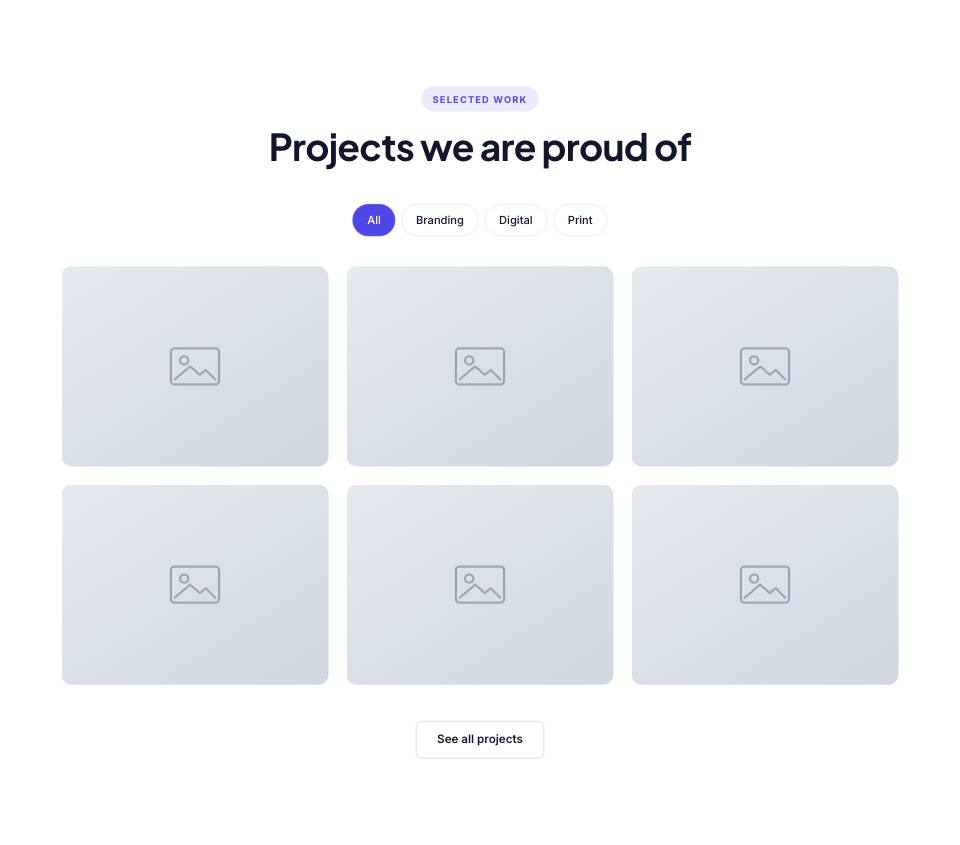
Example#
Paste this into the sections list of a page file:
JSON
{
  "type": "portfolio",
  "eyebrow": "Selected work",
  "title": "Projects we are proud of",
  "columns": 3,
  "items": [
    {
      "image": "placeholder",
      "title": "Harbor Coffee rebrand",
      "category": "Branding"
    },
    {
      "image": "placeholder",
      "title": "Fernway mobile app",
      "category": "Digital"
    },
    {
      "image": "placeholder",
      "title": "Northwind annual report",
      "category": "Print"
    },
    {
      "image": "placeholder",
      "title": "Quillstack website",
      "category": "Digital"
    },
    {
      "image": "placeholder",
      "title": "Tidewater packaging",
      "category": "Branding"
    },
    {
      "image": "placeholder",
      "title": "Brightloom campaign",
      "category": "Print"
    }
  ],
  "buttons": [
    {
      "label": "See all projects",
      "href": "work.html",
      "style": "outline"
    }
  ]
}Options#
| Option | Type | Default | Description |
|---|---|---|---|
eyebrow | string | — | Small label shown above the title. |
title | string (HTML allowed) | — | Section heading. You can use <em> or <br> inside it. |
text | string | — | Short intro paragraph under the title. |
headAlign | string | center | Alignment of the eyebrow/title/text block. "start" puts it on the left. Values: center | start |
items | array | — | The projects. See the "items" fields. |
filters | boolean | true | Show the filter buttons ("All" plus one per category). They only appear when the items have at least two different categories. Values: true | false |
columns | number | 3 | Columns on large screens. Tablets always show 2 and phones 1. Values: 2 | 3 | 4 |
style | string | grid | "grid": equal 4:3 tiles. "masonry": fixed-height rows where items can be marked "wide" or "tall". Values: grid | masonry |
buttons | array | — | Buttons shown centred below the section. See the "buttons" fields. |
Also accepts the options every section accepts: id, tone, padding, fluid, class, hidden.
Fields of each entry in items#
| Option | Type | Default | Description |
|---|---|---|---|
image | string | — | Project photo. |
title | string | — | Project name, shown on hover. |
category | string | — | Category shown above the title and used by the filter buttons. |
link | string | — | Page to open (e.g. "project-harbor.html"). "href" also works. Without a link, clicking opens the image in a full-screen lightbox. |
wide | boolean | — | Masonry style only: the item spans two columns. |
tall | boolean | — | Masonry style only: the item spans two rows. |
Fields of each entry in buttons#
| Option | Type | Default | Description |
|---|---|---|---|
label | string | — | Button text. A button without a label is not shown. |
href | string | — | Link address, e.g. "contact.html" or "#pricing". Default "#". |
style | string | — | primary (default) | outline | light | dark | accent | link. "link" is a text link with an arrow. |
icon | string | — | Bootstrap Icons name shown after the label, without "bi-" (e.g. "arrow-right"). |
video | string | — | A YouTube/Vimeo embed URL. The button then opens the video in a pop-up instead of following href. |
Variants and styles#
grid#
Default. Equal tiles in 2, 3 or 4 columns with filter buttons.
JSON
{
  "type": "portfolio",
  "eyebrow": "Selected work",
  "title": "Projects we are proud of",
  "columns": 3,
  "items": [
    {
      "image": "placeholder",
      "title": "Harbor Coffee rebrand",
      "category": "Branding"
    },
    {
      "image": "placeholder",
      "title": "Fernway mobile app",
      "category": "Digital"
    },
    {
      "image": "placeholder",
      "title": "Northwind annual report",
      "category": "Print"
    },
    {
      "image": "placeholder",
      "title": "Quillstack website",
      "category": "Digital"
    },
    {
      "image": "placeholder",
      "title": "Tidewater packaging",
      "category": "Branding"
    },
    {
      "image": "placeholder",
      "title": "Brightloom campaign",
      "category": "Print"
    }
  ],
  "buttons": [
    {
      "label": "See all projects",
      "href": "work.html",
      "style": "outline"
    }
  ]
}masonry#
Rows of fixed height where some items can be "wide" or "tall" for a magazine-style layout.
JSON
{
  "type": "portfolio",
  "style": "masonry",
  "eyebrow": "Portfolio",
  "title": "Recent interiors",
  "columns": 3,
  "filters": false,
  "items": [
    {
      "image": "placeholder",
      "title": "Loft on Mercer Street",
      "category": "Residential",
      "tall": true
    },
    {
      "image": "placeholder",
      "title": "Maple & Co. offices",
      "category": "Commercial"
    },
    {
      "image": "placeholder",
      "title": "Lakeside cabin",
      "category": "Residential"
    },
    {
      "image": "placeholder",
      "title": "Hotel Ondine lobby",
      "category": "Hospitality",
      "wide": true
    },
    {
      "image": "placeholder",
      "title": "Garden townhouse",
      "category": "Residential"
    },
    {
      "image": "placeholder",
      "title": "Atelier showroom",
      "category": "Commercial"
    },
    {
      "image": "placeholder",
      "title": "Seaside apartment",
      "category": "Residential"
    }
  ]
}Tips#
- Use 6, 9 or 12 items with 3 columns (8 or 12 with 4 columns) so the rows are full.
- Spell categories exactly the same on every item: "Branding" and "branding " become two filters.
- "wide" and "tall" only work with "style": "masonry", and only from tablet width up.
- In masonry, count a wide or tall item as two cells and a wide-and-tall one as four, then aim for full rows (the masonry example: 1 tall + 1 wide + 5 normal = 9 cells = three rows of 3).
Editing it in the HTML files#
Each project is a figure.portfolio-item. Its data-cat must match a filter button's data-filter (lowercase, dashes instead of spaces, e.g. "Web Design" becomes web-design). The lightbox shows the image in the link's data-src.
Where it's used#
Open these pages in template/ to see it working:
- Creative Agency:
template/creative-agency/index.html(sourcesrc/demos/creative-agency/pages/index.json) - Corporate:
template/corporate/case-studies.html(sourcesrc/demos/corporate/pages/case-studies.json) - Restaurant:
template/restaurant/gallery.html(sourcesrc/demos/restaurant/pages/gallery.json) - Coffee Shop:
template/cafe/gallery.html(sourcesrc/demos/cafe/pages/gallery.json) - Hotel & Resort:
template/hotel/amenities.html(sourcesrc/demos/hotel/pages/amenities.json) - Wedding:
template/wedding/gallery.html(sourcesrc/demos/wedding/pages/gallery.json) - Yoga Studio:
template/yoga/gallery.html(sourcesrc/demos/yoga/pages/gallery.json) - Day Spa & Salon:
template/spa/gallery.html(sourcesrc/demos/spa/pages/gallery.json) - Dental Clinic:
template/dental/smile-gallery.html(sourcesrc/demos/dental/pages/smile-gallery.json) - Pet Care:
template/pet-care/gallery.html(sourcesrc/demos/pet-care/pages/gallery.json) - Construction:
template/construction/index.html(sourcesrc/demos/construction/pages/index.json) - Photographer:
template/photography/albums.html(sourcesrc/demos/photography/pages/albums.json) - Architecture Studio:
template/architecture/awards.html(sourcesrc/demos/architecture/pages/awards.json) - Interior Design:
template/interior-design/index.html(sourcesrc/demos/interior-design/pages/index.json) - Portfolio:
template/portfolio/case-fieldnote-app.html(sourcesrc/demos/portfolio/pages/case.json) - Fashion Store:
template/fashion-store/home-2.html(sourcesrc/demos/fashion-store/pages/home-2.json) - Charity:
template/charity/gallery.html(sourcesrc/demos/charity/pages/gallery.json) - Logistics:
template/logistics/case-studies.html(sourcesrc/demos/logistics/pages/case-studies.json)