 Omnira
 Section reference › Pricing & commerce
Plan comparison table "type": "plan-compare"
A feature-by-feature table comparing your plans, with check marks, dashes or short text in each cell. Use it under a pricing section so visitors can see exactly what each plan includes.
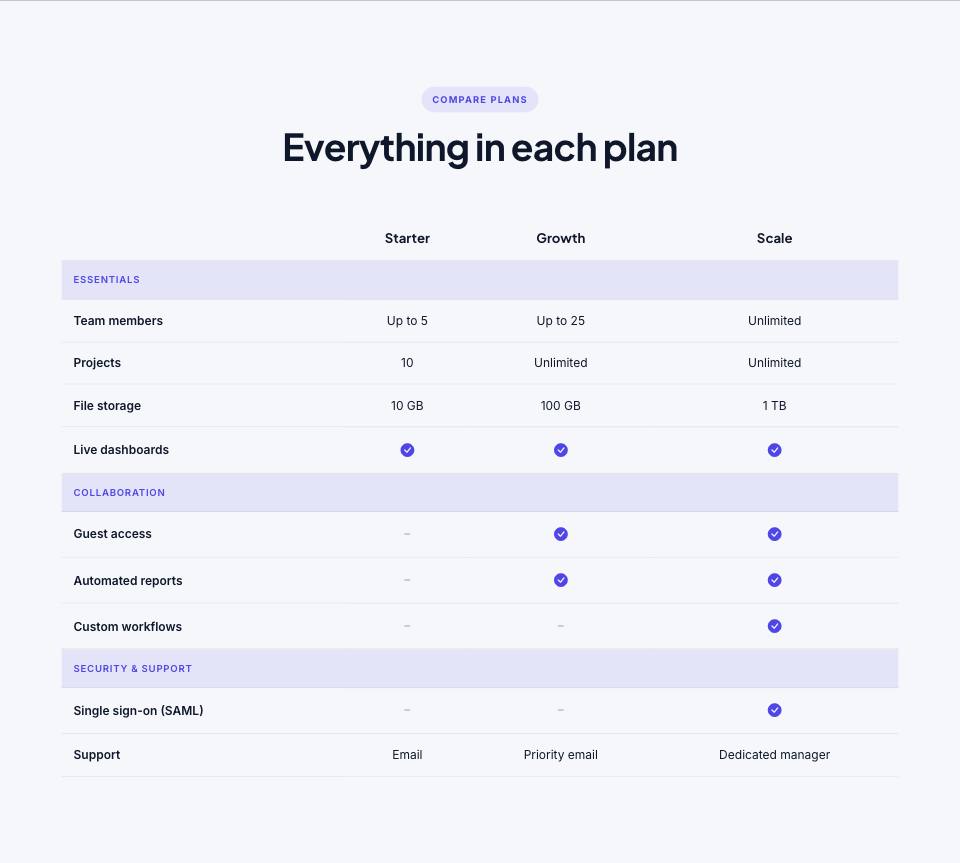
Example#
Paste this into the sections list of a page file:
JSON
{
  "type": "plan-compare",
  "tone": "alt",
  "eyebrow": "Compare plans",
  "title": "Everything in each plan",
  "plans": [
    "Starter",
    "Growth",
    "Scale"
  ],
  "rows": [
    {
      "group": "Essentials"
    },
    {
      "label": "Team members",
      "values": [
        "Up to 5",
        "Up to 25",
        "Unlimited"
      ]
    },
    {
      "label": "Projects",
      "values": [
        "10",
        "Unlimited",
        "Unlimited"
      ]
    },
    {
      "label": "File storage",
      "values": [
        "10 GB",
        "100 GB",
        "1 TB"
      ]
    },
    {
      "label": "Live dashboards",
      "values": [
        true,
        true,
        true
      ]
    },
    {
      "group": "Collaboration"
    },
    {
      "label": "Guest access",
      "values": [
        false,
        true,
        true
      ]
    },
    {
      "label": "Automated reports",
      "values": [
        false,
        true,
        true
      ]
    },
    {
      "label": "Custom workflows",
      "values": [
        false,
        false,
        true
      ]
    },
    {
      "group": "Security & support"
    },
    {
      "label": "Single sign-on (SAML)",
      "values": [
        false,
        false,
        true
      ]
    },
    {
      "label": "Support",
      "values": [
        "Email",
        "Priority email",
        "Dedicated manager"
      ]
    }
  ]
}Options#
| Option | Type | Default | Description |
|---|---|---|---|
eyebrow | string | — | Small label shown above the title. |
title | string (HTML allowed) | — | Section heading. You can use <em> or <br> inside it. |
text | string | — | Short intro paragraph under the title. |
headAlign | string | center | Alignment of the eyebrow/title/text block. "start" puts it on the left. Values: center | start |
plans | array of strings | — | Plan names, one per column, in order. |
rows | array | — | Table rows: either a feature row or a group heading. See the "rows" entries. |
Also accepts the options every section accepts: id, tone, padding, fluid, class, hidden.
Fields of each entry in rows#
| Option | Type | Default | Description |
|---|---|---|---|
label | string | — | Feature name in the first column. |
values | array | — | One value per plan, in the same order as "plans": true shows a check mark, false shows a dash, any text (e.g. "10 GB", "Unlimited") is shown as written. |
group | string | — | Use a row with only "group" to start a new group with a heading, e.g. {"group": "Security"}. |
Tips#
- Each "values" list must have exactly one entry per plan, otherwise cells shift into the wrong column.
- Write true/false without quotes to get icons. "true" in quotes is shown as the word true.
- On phones the table scrolls sideways, so 3 or 4 plans work best.
Editing it in the HTML files#
It is a normal HTML table (table.plan-compare). Plan names are the th cells in thead; each feature is a tr in tbody. A check is <i class="bi bi-check-circle-fill pc-yes"> and a dash is <i class="bi bi-dash pc-no">.
Where it's used#
Open these pages in template/ to see it working:
- Creative Agency:
template/creative-agency/pricing.html(sourcesrc/demos/creative-agency/pages/pricing.json) - Corporate:
template/corporate/engagements.html(sourcesrc/demos/corporate/pages/engagements.json) - Finance:
template/finance/home-2.html(sourcesrc/demos/finance/pages/home-2.json) - SaaS Product:
template/saas/home-2.html(sourcesrc/demos/saas/pages/home-2.json) - Mobile App:
template/mobile-app/features.html(sourcesrc/demos/mobile-app/pages/features.json) - Tech Conference:
template/conference/tickets.html(sourcesrc/demos/conference/pages/tickets.json) - Online Academy:
template/education/pricing.html(sourcesrc/demos/education/pages/pricing.json) - Restaurant:
template/restaurant/gift-cards.html(sourcesrc/demos/restaurant/pages/gift-cards.json) - Coffee Shop:
template/cafe/home-2.html(sourcesrc/demos/cafe/pages/home-2.json) - Hotel & Resort:
template/hotel/offers.html(sourcesrc/demos/hotel/pages/offers.json) - Wedding:
template/wedding/pricing.html(sourcesrc/demos/wedding/pages/pricing.json) - Gym & Fitness:
template/gym/home-2.html(sourcesrc/demos/gym/pages/home-2.json) - Yoga Studio:
template/yoga/classes.html(sourcesrc/demos/yoga/pages/classes.json) - Day Spa & Salon:
template/spa/packages.html(sourcesrc/demos/spa/pages/packages.json) - Medical Clinic:
template/medical/insurance.html(sourcesrc/demos/medical/pages/insurance.json) - Dental Clinic:
template/dental/pricing.html(sourcesrc/demos/dental/pages/pricing.json) - Pet Care:
template/pet-care/boarding.html(sourcesrc/demos/pet-care/pages/boarding.json) - Construction:
template/construction/pricing.html(sourcesrc/demos/construction/pages/pricing.json) - Car Dealer:
template/car-dealer/finance.html(sourcesrc/demos/car-dealer/pages/finance.json) - Travel Agency:
template/travel/pricing.html(sourcesrc/demos/travel/pages/pricing.json) - Photographer:
template/photography/packages.html(sourcesrc/demos/photography/pages/packages.json) - Interior Design:
template/interior-design/packages.html(sourcesrc/demos/interior-design/pages/packages.json) - Portfolio:
template/portfolio/rates.html(sourcesrc/demos/portfolio/pages/rates.json) - Music Festival:
template/music-festival/home-2.html(sourcesrc/demos/music-festival/pages/home-2.json) - Fashion Store:
template/fashion-store/size-guide.html(sourcesrc/demos/fashion-store/pages/size-guide.json) - Logistics:
template/logistics/home-2.html(sourcesrc/demos/logistics/pages/home-2.json)