 Omnira
 Section reference › Demo-specific
BMI calculator "type": "gym-bmi"
A working body-mass-index calculator (metric or imperial) with a colour scale, next to a heading, checklist and buttons. Made for the gym demo; fits any fitness or health site.
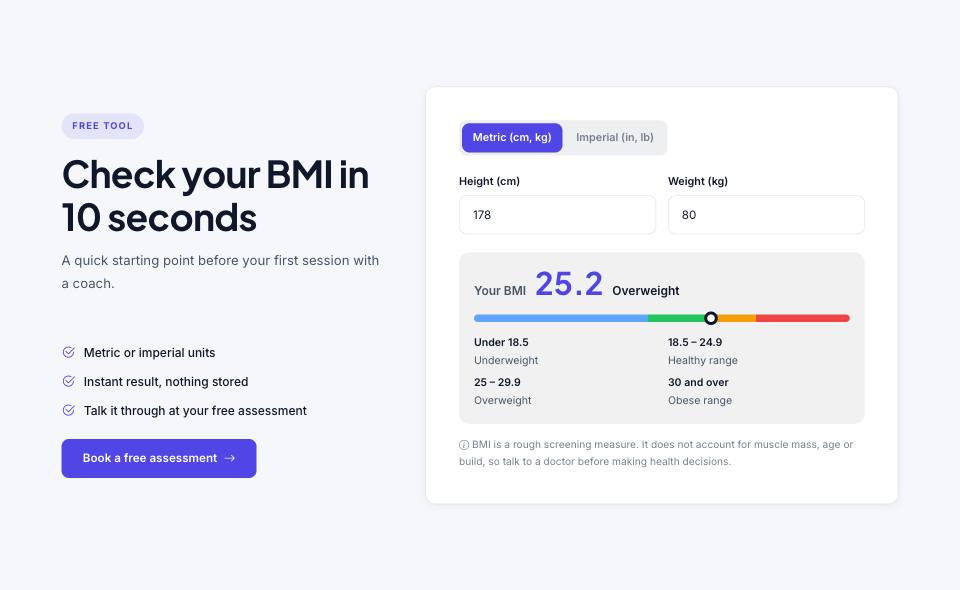
Example#
Paste this into the sections list of a page file:
JSON
{
  "type": "gym-bmi",
  "tone": "alt",
  "eyebrow": "Free tool",
  "title": "Check your BMI in 10 seconds",
  "text": "A quick starting point before your first session with a coach.",
  "list": [
    "Metric or imperial units",
    "Instant result, nothing stored",
    "Talk it through at your free assessment"
  ],
  "buttons": [
    {
      "label": "Book a free assessment",
      "href": "free-trial.html",
      "style": "primary",
      "icon": "arrow-right"
    }
  ]
}Options#
| Option | Type | Default | Description |
|---|---|---|---|
eyebrow | string | — | Small label shown above the title. |
title | string | — | Section heading. Simple inline HTML such as <em> or <br> is allowed. |
text | string | — | Short intro paragraph under the title. |
list | array | — | Checklist (strings) under the heading. |
image | string | — | Optional photo under the checklist. |
buttons | array | — | Buttons shown under the heading. See the button fields below. |
note | string | BMI is a rough screening measure. It does not account for muscle mass, age or build, so talk to a doctor before making health decisions. | Small disclaimer under the result. |
height | number | 178 | Starting height in cm. |
weight | number | 80 | Starting weight in kg. |
reverse | boolean | false | Puts the calculator on the left. |
Also accepts the options every section accepts: id, tone, padding, fluid, class, hidden.
Fields of each entry in buttons#
| Option | Type | Default | Description |
|---|---|---|---|
label | string | — | Button text. A button without a label is not shown. |
href | string | — | Link target, e.g. "contact.html" or "#pricing". Defaults to "#". |
style | string | primary | Button look. Values: primary | outline | light | dark | accent | link |
icon | string | — | Bootstrap Icons name shown after the label (e.g. "arrow-right"). "link" buttons get an arrow automatically. |
video | string | — | YouTube embed URL (https://www.youtube.com/embed/VIDEO_ID). When set, the button opens the video in a pop-up instead of following href. |
Tips#
- The heading is always left-aligned in this section; headAlign is ignored.
Where it's used#
Open these pages in template/ to see it working:
- Gym & Fitness:
template/gym/home-2.html(sourcesrc/demos/gym/pages/home-2.json)