 Omnira
 Section reference › Content
Countdown "type": "countdown"
A centred band with a live days/hours/minutes/seconds countdown to a date, plus heading and buttons. Use it for events, launches and sales.
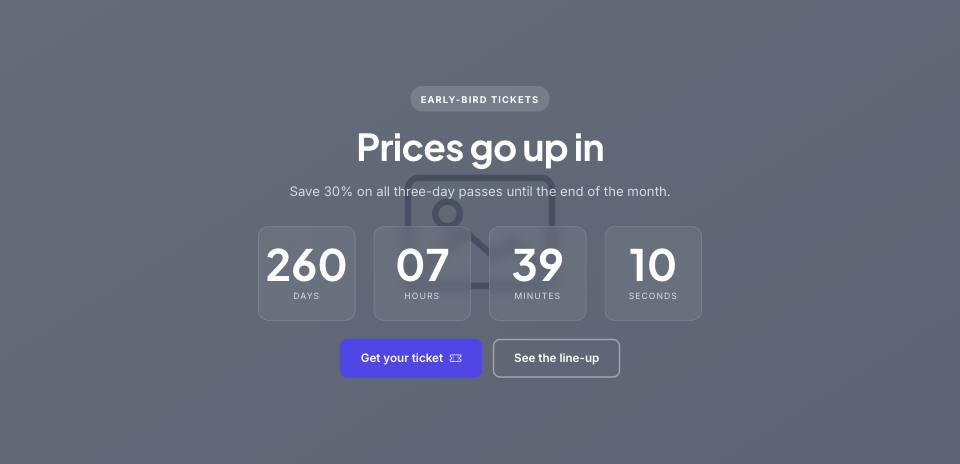
Example#
Paste this into the sections list of a page file:
JSON
{
  "type": "countdown",
  "image": "placeholder",
  "eyebrow": "Early-bird tickets",
  "title": "Prices go up in",
  "text": "Save 30% on all three-day passes until the end of the month.",
  "date": "2027-06-12T16:00:00",
  "buttons": [
    {
      "label": "Get your ticket",
      "href": "tickets.html",
      "style": "primary",
      "icon": "ticket-perforated"
    },
    {
      "label": "See the line-up",
      "href": "lineup.html",
      "style": "outline"
    }
  ]
}Options#
| Option | Type | Default | Description |
|---|---|---|---|
eyebrow | string | — | Small label shown above the title. |
title | string | — | Section heading. Simple inline HTML such as <em> or <br> is allowed. |
text | string | — | Short intro paragraph under the title. |
date | string | — | Target date and time, e.g. "2027-06-12T16:00:00". Required. |
image | string | — | Optional background photo. |
overlay | number | 0.6 | Darkness over the photo, 0 to 1. |
buttons | array | — | Buttons shown under the timer. See the button fields below. |
Also accepts the options every section accepts: id, tone, padding, fluid, class, hidden.
Fields of each entry in buttons#
| Option | Type | Default | Description |
|---|---|---|---|
label | string | — | Button text. A button without a label is not shown. |
href | string | — | Link target, e.g. "contact.html" or "#pricing". Defaults to "#". |
style | string | primary | Button look. Values: primary | outline | light | dark | accent | link |
icon | string | — | Bootstrap Icons name shown after the label (e.g. "arrow-right"). "link" buttons get an arrow automatically. |
video | string | — | YouTube embed URL (https://www.youtube.com/embed/VIDEO_ID). When set, the button opens the video in a pop-up instead of following href. |
Tips#
- Default tone is "dark" when an image is set and "alt" otherwise.
- The date uses the visitor's time zone unless you add an offset, e.g. "2027-06-12T16:00:00+01:00". After the date it shows 00 everywhere.
- "fluid" has no effect on this section.
Where it's used#
Open these pages in template/ to see it working:
- Finance:
template/finance/home-2.html(sourcesrc/demos/finance/pages/home-2.json) - Tech Conference:
template/conference/home-2.html(sourcesrc/demos/conference/pages/home-2.json) - Online Academy:
template/education/home-2.html(sourcesrc/demos/education/pages/home-2.json) - Restaurant:
template/restaurant/home-2.html(sourcesrc/demos/restaurant/pages/home-2.json) - Hotel & Resort:
template/hotel/home-2.html(sourcesrc/demos/hotel/pages/home-2.json) - Wedding:
template/wedding/index.html(sourcesrc/demos/wedding/pages/index.json) - Gym & Fitness:
template/gym/home-2.html(sourcesrc/demos/gym/pages/home-2.json) - Yoga Studio:
template/yoga/home-2.html(sourcesrc/demos/yoga/pages/home-2.json) - Day Spa & Salon:
template/spa/home-2.html(sourcesrc/demos/spa/pages/home-2.json) - Medical Clinic:
template/medical/home-2.html(sourcesrc/demos/medical/pages/home-2.json) - Car Dealer:
template/car-dealer/index.html(sourcesrc/demos/car-dealer/pages/index.json) - Travel Agency:
template/travel/index.html(sourcesrc/demos/travel/pages/index.json) - Photographer:
template/photography/home-2.html(sourcesrc/demos/photography/pages/home-2.json) - Music Festival:
template/music-festival/home-2.html(sourcesrc/demos/music-festival/pages/home-2.json) - Fashion Store:
template/fashion-store/index.html(sourcesrc/demos/fashion-store/pages/index.json) - Charity:
template/charity/events.html(sourcesrc/demos/charity/pages/events.json)