 Omnira
 Section reference › Utility pages
Sign in / register "type": "auth"
A login card with "Sign in" and "Create account" tabs next to a photo with a quote. Use it for a login or member page; the forms are front-end only.
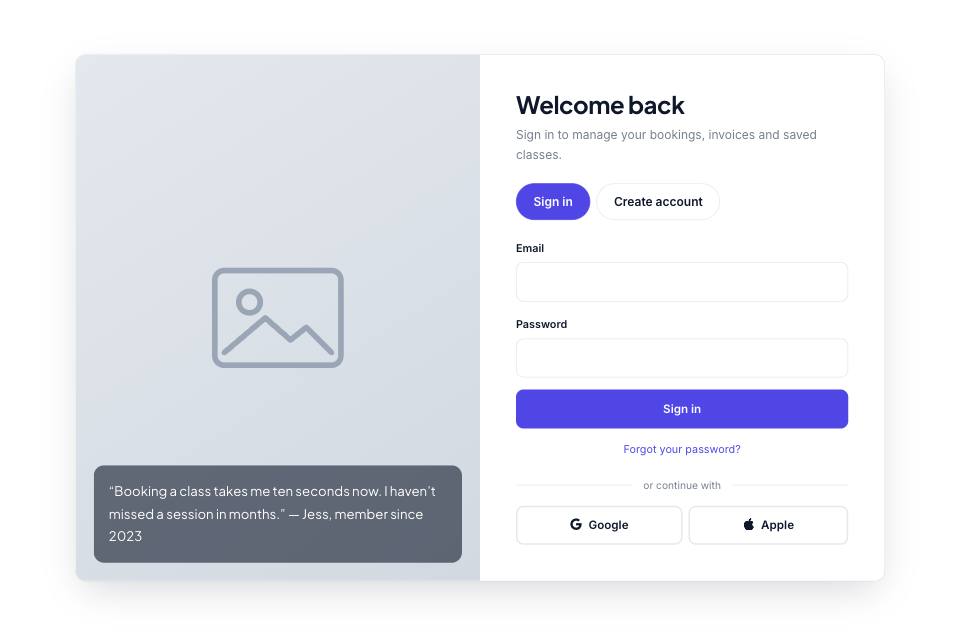
Example#
Paste this into the sections list of a page file:
JSON
{
  "type": "auth",
  "title": "Welcome back",
  "text": "Sign in to manage your bookings, invoices and saved classes.",
  "image": "placeholder",
  "quote": "“Booking a class takes me ten seconds now. I haven’t missed a session in months.” — Jess, member since 2023",
  "roles": [
    "Member",
    "Trainer",
    "Corporate client"
  ]
}Options#
| Option | Type | Default | Description |
|---|---|---|---|
title | string | Welcome back | Heading (the page's h1). |
text | string | — | Short line under the heading. |
image | string | — | Photo on the left half (hidden on small screens). |
quote | string | — | Quote shown over the photo. |
roles | array | false | ["Customer", "Business", "Other"] | Choices for the "I am a" dropdown on the Create account tab. Set to false to remove the dropdown. |
Also accepts the options every section accepts: id, tone, padding, fluid, class, hidden.
Tips#
- This is a design, not a working login system: both forms post to formAction in site.json (or just show a thank-you message). Connect them to your own back end before collecting passwords.
- You can have more than one auth section on a page; each gets its own ids.
- Default padding is "sm". The section contains the page's h1.
Editing it in the HTML files#
The two forms are in #auth-in and #auth-up. The Google and Apple buttons are plain links under .auth-or: point them at your sign-in provider or delete them.
Where it's used#
Open these pages in template/ to see it working:
- Real Estate:
template/real-estate/login.html(sourcesrc/demos/real-estate/pages/login.json) - SaaS Product:
template/saas/login.html(sourcesrc/demos/saas/pages/login.json) - Mobile App:
template/mobile-app/login.html(sourcesrc/demos/mobile-app/pages/login.json) - Online Academy:
template/education/login.html(sourcesrc/demos/education/pages/login.json)