 Omnira
 Section reference › Real estate
Agents "type": "agents"
A grid of real-estate agent cards with photo, role, listing count and call/email buttons. Each card links to that agent's profile page.
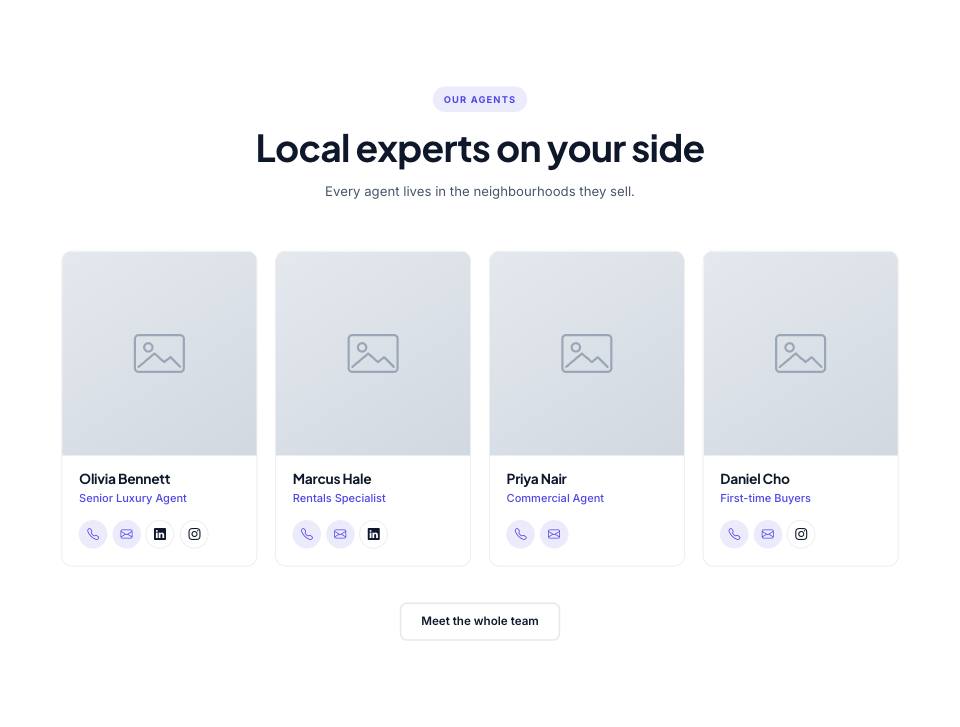
Example#
Paste this into the sections list of a page file:
JSON
{
  "type": "agents",
  "eyebrow": "Our agents",
  "title": "Local experts on your side",
  "text": "Every agent lives in the neighbourhoods they sell.",
  "columns": 4,
  "items": [
    {
      "slug": "olivia-bennett",
      "name": "Olivia Bennett",
      "role": "Senior Luxury Agent",
      "image": "placeholder",
      "phone": "+1 (555) 014-2201",
      "email": "olivia@example.com",
      "social": {
        "linkedin": "#",
        "instagram": "#"
      }
    },
    {
      "slug": "marcus-hale",
      "name": "Marcus Hale",
      "role": "Rentals Specialist",
      "image": "placeholder",
      "phone": "+1 (555) 014-2202",
      "email": "marcus@example.com",
      "social": {
        "linkedin": "#"
      }
    },
    {
      "slug": "priya-nair",
      "name": "Priya Nair",
      "role": "Commercial Agent",
      "image": "placeholder",
      "phone": "+1 (555) 014-2203",
      "email": "priya@example.com"
    },
    {
      "slug": "daniel-cho",
      "name": "Daniel Cho",
      "role": "First-time Buyers",
      "image": "placeholder",
      "phone": "+1 (555) 014-2204",
      "email": "daniel@example.com",
      "social": {
        "instagram": "#"
      }
    }
  ],
  "buttons": [
    {
      "label": "Meet the whole team",
      "href": "agents.html",
      "style": "outline"
    }
  ]
}Options#
| Option | Type | Default | Description |
|---|---|---|---|
eyebrow | string | — | Small label shown above the title. |
title | string | — | Section heading. Simple inline HTML such as <em> or <br> is allowed. |
text | string | — | Short intro paragraph under the title. |
headAlign | string | center | Alignment of the eyebrow/title/text block. Any value other than "center" (e.g. "start") left-aligns it. Values: center | start |
items | array | — | Agent records. In the real-estate demo this is { "$data": "agents" } (all agents from data.json); you can also write the records directly. |
columns | number | 4 | Cards per row on large screens. Values: 1 | 2 | 3 | 4 | 6 |
buttons | array | — | Buttons shown centred under the grid. See the button fields below. |
Also accepts the options every section accepts: id, tone, padding, fluid, class, hidden.
Fields of each entry in items#
| Option | Type | Default | Description |
|---|---|---|---|
slug | string | — | Unique id. The card links to agent-<slug>.html. |
name | string | — | Full name. |
role | string | — | Job title. |
image | string | — | Portrait photo. |
phone | string | — | Phone number for the call button. Required. |
email | string | — | Email address for the email button. Required. |
social | object | — | Optional social links: { "linkedin": "https://…" }. |
Fields of each entry in buttons#
| Option | Type | Default | Description |
|---|---|---|---|
label | string | — | Button text. A button without a label is not shown. |
href | string | — | Link target, e.g. "contact.html" or "#pricing". Defaults to "#". |
style | string | primary | Button look. Values: primary | outline | light | dark | accent | link |
icon | string | — | Bootstrap Icons name shown after the label (e.g. "arrow-right"). "link" buttons get an arrow automatically. |
video | string | — | YouTube embed URL (https://www.youtube.com/embed/VIDEO_ID). When set, the button opens the video in a pop-up instead of following href. |
Tips#
- In a multi-page real-estate demo, use "items": { "$data": "agents" } (or add "limit": 4) instead of writing agents by hand; the records then come from data.json.
- The listing count on each photo counts the properties in data.json whose "agent" matches the slug. On a page without property data it shows "0 listings".
- Use 4 or 8 agents with the default 4 columns so rows are full.
Editing it in the HTML files#
Each card is an article.agent-tile. The listing count is plain text inside .agent-count, so you can edit it directly in the HTML.
Where it's used#
Open these pages in template/ to see it working:
- Real Estate:
template/real-estate/about.html(sourcesrc/demos/real-estate/pages/about.json)